
As a registered DRep you can vote on open governance actions directly on DRepTalk and sign the vote in your own wallet. Voting is the core of the role: it is how you turn the voting power delegated to you into a decision on each action. This guide covers who can vote, how the flow works, and what happens to your vote and rationale.
Who can vote
Voting is open to DReps whose registration is active on-chain, using a wallet that supports DRep features (Lace, Eternl, or Typhon work well). Reading governance actions and discussion is public and needs no wallet, but casting a vote requires you to be connected and recognized as an active DRep. SPOs, constitutional committee members, and direct voters do not vote through this flow. How a stake pool operator votes is covered in Voting as an SPO.
How to vote
You can vote in two places: inline on a governance action, or from your voting dashboard.
- Connect your wallet and make sure you are on the right network.
- Open an action that is still accepting votes, or go to your voting dashboard to see every open action and how you have voted so far.
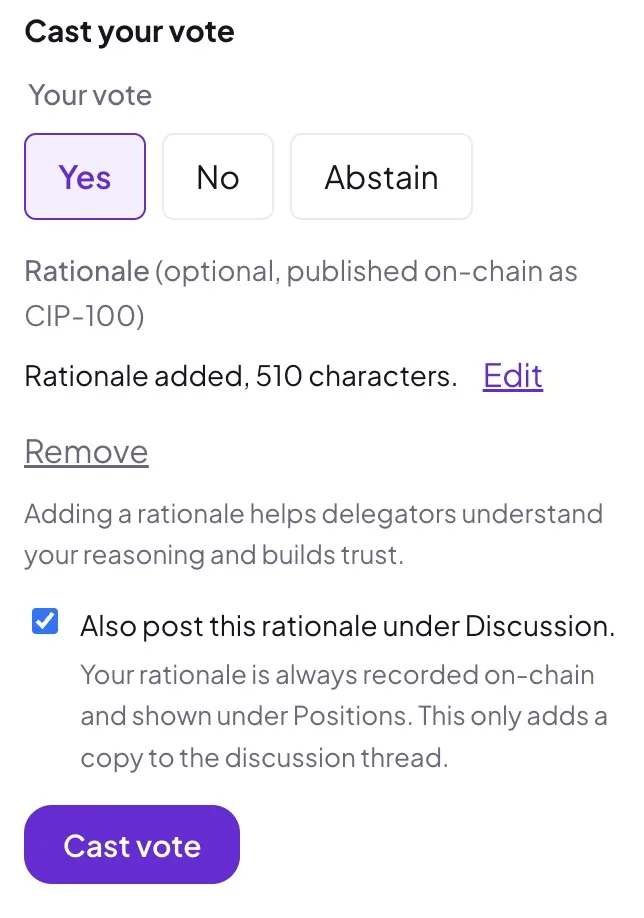
- Choose Yes, No, or Abstain.
- Optionally add a rationale explaining your decision.
- Approve the transaction in your wallet.
The vote is built for you, but your wallet signs and submits it. Your private keys never leave your wallet. DRepTalk never sees them. Your vote appears immediately and is confirmed once it is recorded on-chain.
Adding a rationale
A rationale is optional but encouraged. When you include one, it is recorded with your vote on-chain and shown on the action’s Votes tab, and you can see the link to the on-chain record before you sign. A checkbox lets you also post a copy into the action’s discussion thread so others can respond, that cross-post is off by default. The on-chain rationale is permanent and cannot be edited, since it reflects what was committed on-chain. A rationale written on DRepTalk is stored directly, whatever your voting power. For votes cast outside DRepTalk, the rationale document is fetched from the chain only for voters with at least 10,000 ada of voting weight. Until a linked document can be read, the vote shows Rationale unavailable. For what makes a good rationale and how to structure it, see Writing a vote rationale.
Changing your vote
While an action is still open you can change your vote. Cast again with the new choice and the later vote replaces the earlier one on-chain. If you included a rationale, it is replaced along with the vote. Once the action closes, votes are final.