
Every Cardano governance action has its own page on DRepTalk, whether or not anyone has commented on it yet. The page collects everything about the action in one place: what it proposes, what the community says about it, who voted and why, and where it stands in its lifecycle. This guide walks through each part of the page.
You can reach an action from the governance actions list, from a DRep’s voting record, or by pasting its id into the search box. The list offers several sort orders. Sorting governance actions explains what each one means.
The tab bar
Under the action’s title sits a tab bar with five tabs: Overview, Discussion, Votes, On-chain Data, and History. Discussion and Votes carry counts, so you can see at a glance how much conversation and how many votes an action has drawn. On a phone the bar scrolls sideways.

Overview
The Overview is what the proposer submitted: a summary of the on-chain changes the action would make, followed by the abstract, motivation, and rationale from the proposal’s metadata. It is the tab to read first when you want to understand what is actually being decided.
Below the proposal text, Rationale highlights shows a balanced selection of vote rationales: the strongest Yes and No positions by voting power, each expandable in place. It is a quick way to hear the best argument from both sides without reading every vote.
The sidebar next to the content answers the status questions:
- Status. Where the action stands (active, ratified, enacted, expired) and, while it is open, when the voting window ends. The labels are explained in Governance action statuses.
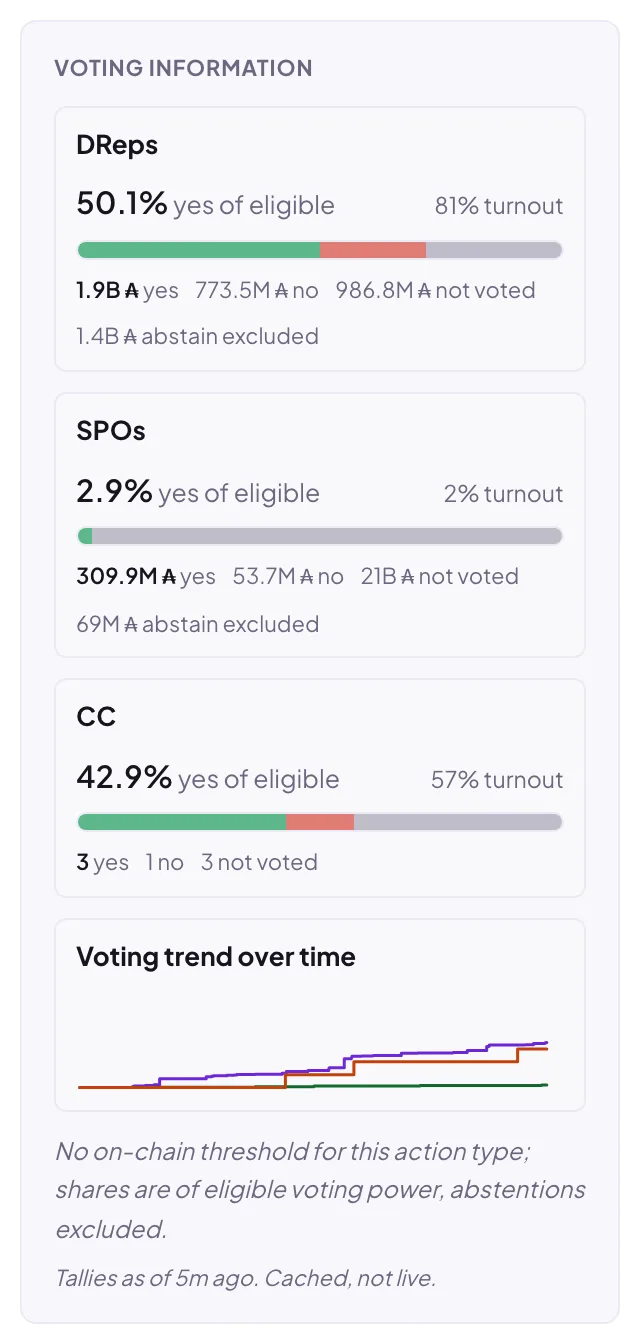
- Voting information. One row per voting body (DReps, SPOs, the Constitutional Committee). Each row reads “X% yes of the counted stake”: the same basis the chain uses for ratification, where abstaining stake is excluded and stake that did not vote is folded into the No side. Actions with an on-chain approval threshold show the threshold as a marker on the bar and a Met or Not met verdict. An “excluded” line under the bar expands to a full-stake breakdown of what the tally counts and what it leaves out. Not every body votes on every action: Governance action types lists who votes on what.
- Proposer and Authors. Who submitted the action and who signed its proposal document. More from this proposer lists their other actions.
- Discussed as a draft. Shown when the action links a Proposal Drafts thread, where it was discussed before submission.
- References. The links from the proposal document.
Discussion
The Discussion tab is the action’s public thread. Anyone can read it without signing in. Posting requires an on-chain governance identity: DReps, proposers and their co-proposers, SPOs, and Constitutional Committee members can sign in and post. Every post carries its author’s verified on-chain identity and links back to their profile, so you always know whether a comment comes from a DRep, the proposer, or another voter.
Frozen rationales
Some posts in the discussion are labeled Rationale and marked as frozen. These are vote rationales that a DRep chose to cross-post into the thread when casting their vote. The original document is committed on-chain together with the vote and cannot change afterwards, so the discussion copy cannot be edited either: what you read is exactly what was committed, with a link to the on-chain record. You can reply to a frozen rationale like any other post.
If the DRep later changes their vote, the frozen copy does not linger: it is replaced by the new rationale, or removed if the DRep did not cross-post again.
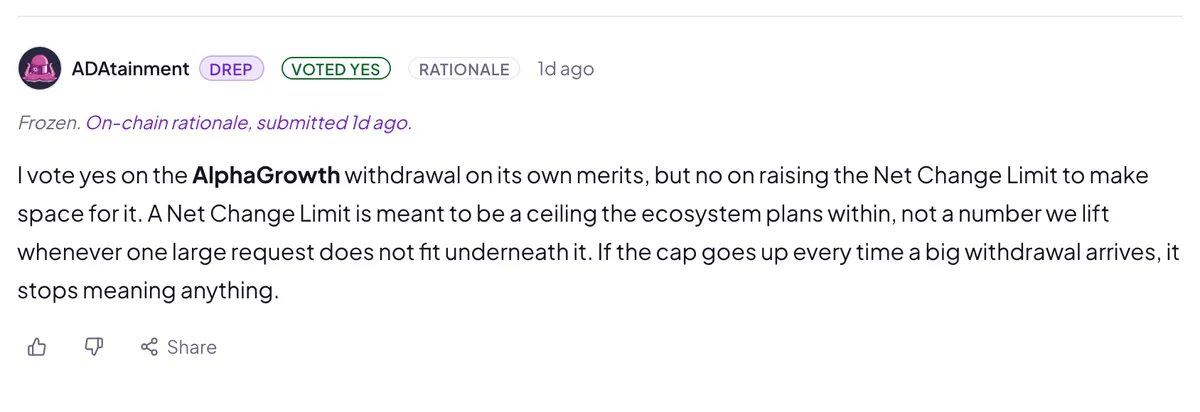
This one is live too: read this frozen rationale in its discussion.
Votes
The Votes tab lists every DRep and SPO vote on the action, with a toggle to switch between the two bodies. A third CC segment appears when the action has Constitutional Committee votes. DRep votes are ordered by the DRep’s current voting power, SPO votes by the newest vote first. Rows with a rationale expand in place so you can read the reasoning without leaving the page. A vote that links a rationale DRepTalk could not read shows Rationale unavailable. Above the list, a short concentration strip reads how few voters cast half of the voted power, the largest voter’s share, the combined top 5, and how many of the largest voters together held as much power as the threshold required.
Two markers are worth knowing:
- Changed votes. While an action is open, a voter can vote again and the newer vote replaces the older one. When that happened, the row shows the earlier votes too, so vote changes are transparent rather than silent. A re-vote that switched position carries a Changed tag, one that kept the position (for example to attach a rationale) carries a Revoted tag.
- Not counted. Votes can technically still be cast after an action is ratified, but the tally was frozen at ratification. Late votes appear in the list and are marked as not counted in the outcome.
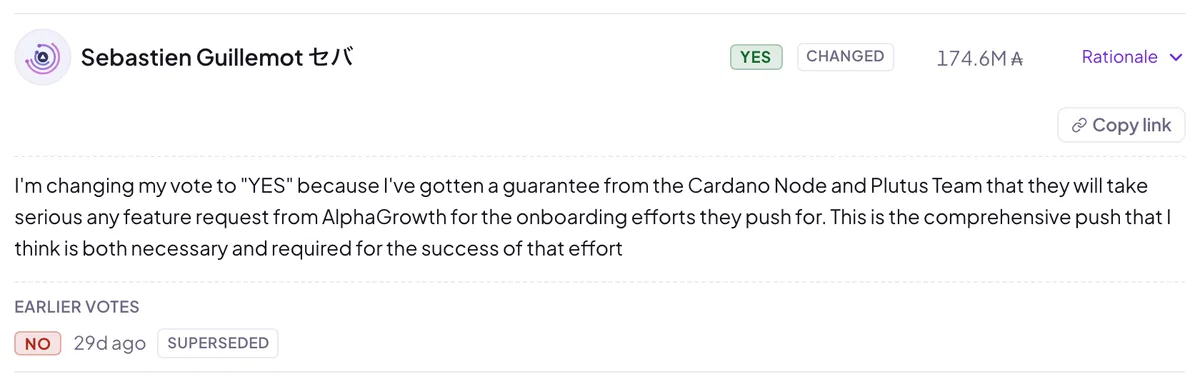
The row above is a real example. See this vote live on the action’s Votes tab, including the earlier vote it replaced.
Every vote row has a copy-link button, so you can share a link that opens the page with exactly that vote expanded and highlighted. Votes with a rationale also have their own shareable page. See Linking to DReps, governance actions, and votes.
On-chain Data
The On-chain Data tab shows the action’s raw on-chain fields: ids, deposit, return address, anchor URL and hash, and the type-specific values the action would set. It is the reference tab when you want the exact values rather than the narrative.
History
The History tab shows the action’s lifecycle as a timeline: when it was submitted, how support developed over the voting window, and how it ended. A chart tracks cumulative Yes support per voting body across the window, so you can see whether an action cleared its threshold early or crossed the line late. Epochs are shown with their calendar dates. A Compare with picker overlays a second, concluded action of the same type on the chart, both curves aligned on day 0 of their own voting window.
Frequently asked questions
Who can post in a governance action's discussion?
Anyone can read. Posting needs a sign-in with an on-chain governance role, and delegators can only read.
Why is a rationale post in the discussion marked as frozen?
It copies a rationale committed on-chain with a vote, so it cannot be edited here.
Why is a vote marked as not counted?
It was cast after the action was already ratified, so it did not change the outcome.
Are the vote numbers on the page live?
They sync from the chain every few minutes, and each page shows the time of its data.